Blog · Buying Guide
How to choose a mini UPS for a WiFi router
A router backup is a small purchase that fails in predictable ways: the voltage is wrong, the current is short, or the battery is sized for the outage the buyer hoped for instead of the outage they get. This guide works through the three decisions in the order they should be made — voltage, current, capacity — with the numbers from real models in the Norvatt range as the worked examples.
Decision one: voltage is not negotiable
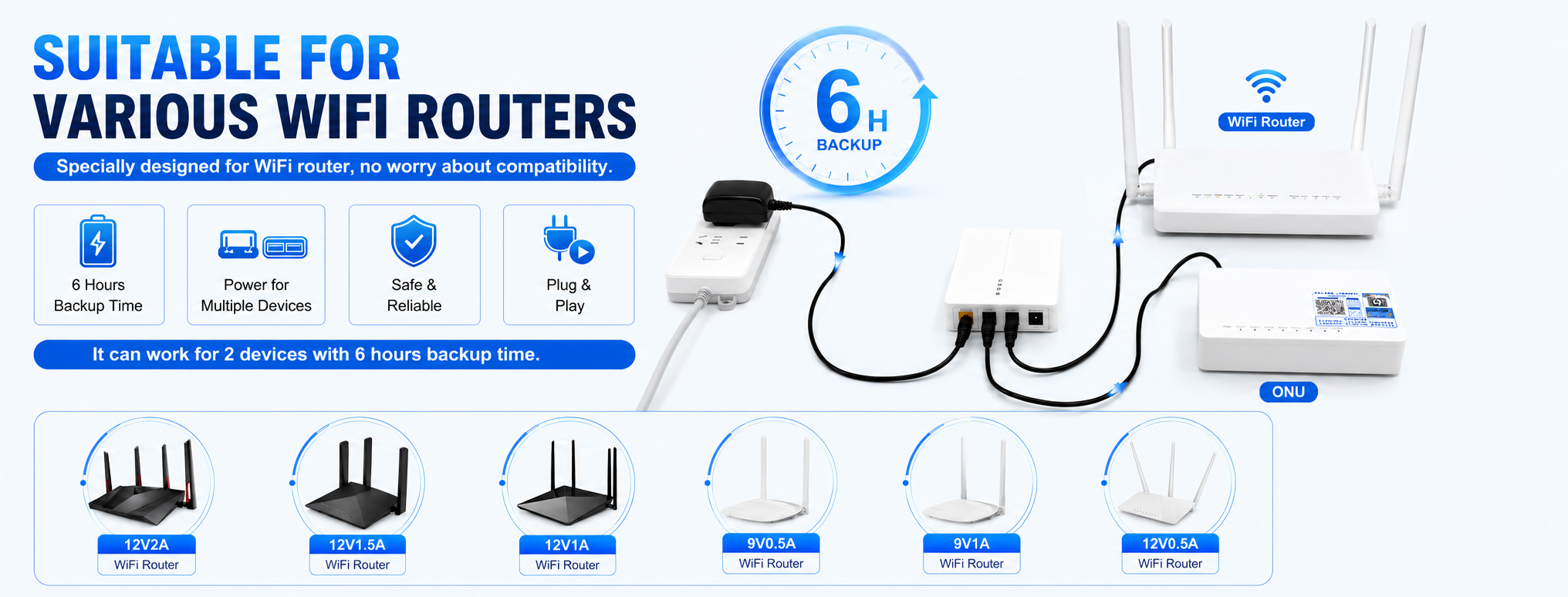
Start at the adapter labels, not at the product listings. A home network usually has two powered boxes before the internet exists: the router and the modem or optical network unit (ONU) that feeds it. Each carries a rating — very often 12V for one and 9V for the other, sometimes 5V on smaller units. Those numbers are the whole game. A UPS output must match the device voltage exactly: undervoltage and overvoltage are the two ways to get it wrong. There is no 'close enough' with DC voltage.
This is why the most useful router UPS units carry more than one voltage. A multi-output model such as the Optima 301 puts DC 12V on two ports and DC 9V on a third, which maps one-to-one onto the standard router-plus-ONU-plus-a-spare arrangement. If both boxes happen to run on 12V, a dual-output 12V unit like the Effcium A12 does the same job on one voltage. If there is only one device to protect — just the router, with the modem elsewhere — a single-output 12V 2A model is enough, and the choice moves to the next two decisions.
Decision two: current, with headroom
The second number on the adapter is current, in amps. The UPS port must be rated at or above it: a router labelled 12V 2A needs a 12V port rated 2A, not 1A. In practice most routers draw well under their adapter rating most of the time — the rating covers the radio's peaks and the boot surge — but the port still has to carry that surge, which is why the adapter figure is the floor. Treat the adapter current as the floor for the port rating.
Add the devices up per port, not per household. Two devices on one 2A port must together stay under 2A; two devices on two separate 2A ports each get their own budget. The port layout tables on the model pages exist precisely so this arithmetic can be done before buying, in the open, instead of being discovered during the first real outage.
Decision three: capacity is time
Capacity, in milliamp-hours, is the decision that buys hours. The method is simple at the level a buyer needs: divide the battery's watt-hours by the load's watts and the result is the rough runtime, less conversion losses. The load figure comes from the devices' own adapter labels — the router's and the modem's rated watts added together — and the energy figure from the model itself: the Optima A1's 10,400 mAh pack is 38.48 Wh, for example. Stepping through a maker's capacity tiers on one model keeps the comparison apples-to-apples by construction, because the case, the ports and the conversion path stay identical.
The Optima 301 shows the pattern: 6,000, 7,800 and 9,900 mAh tiers in the same case with the same ports, and a battery life of up to 6 hours. The tiers exist because outage profiles differ more than routers do. An apartment with a reliable grid and occasional blips runs that division against a short outage profile; a house at the end of a rural line, or an office whose internet is its till, runs it against a longer one and is pointed at the big tier or a class up entirely: the Effcium B12 puts 15,600 mAh behind one 12V output, and the high-capacity Maxora puts 31,200 mAh behind one strong 12V 3A rail.
The two mistakes this guide exists to prevent
The first mistake is buying by device instead of by set. A router backup that leaves the modem dark leaves the path open at the modem; the internet arrives through both boxes, so both belong on the battery. The second mistake is treating the step-up cable as equivalent to a UPS. A step-up cable — USB 5V in, 9V or 12V out — genuinely works: plug it between a power bank and the router and the router is fed from the bank. But it is manual, it shares the power bank with every phone in the house, and its 0.5A ceiling fits only light routers. As a spare or a travel kit it is excellent; as the system, an automatic in-circuit mini UPS is the right tool.
Worked end to end, the usual answer for a standard home set — a 12V router, a 9V ONU, outages measured in minutes to a couple of hours — is a mid-tier multi-output unit: the Optima 301 in its Pro tier, or the Optima A1 if a USB-powered device joins the set. Unusual cases move from there in one step: years-long unattended duty points at the LiFePO4 models, very long outages at the high-capacity class, and a PoE camera joining the network at the Ethrx line. Every one of those jumps is justified by exactly one of the three decisions above — which is the sign the framework is doing its work.
A worked example: one home, three answers
Make it concrete. A home shelf holds a 12V router and a 9V modem, and the street's outages run to two or three hours. The port question is settled immediately — the pair wants a multi-output unit — and the contest is among tiers. On the Optima 301's ladder (6,000, 7,800 and 9,900 mAh behind the same 27 W port set), the pair's combined wattage settles that contest: divide each tier's stored energy by the draw, and the tier whose quotient covers two to three hours is the answer — the long evening cut is the one the household actually remembers. Change one fact — make the modem 12V as well, so the pair wants two 12V rails — and the answer moves to the A1's 51212 layout at 10,400 mAh (38.48 Wh), not because it is bigger, but because its panel matches the shelf. Change a different fact — outages measured in evenings, not hours — and the same division points up the capacity ladder, to the C1's 16,000 or 20,000 mAh builds. Same shelf, same devices, three different right answers: the guide's whole argument in one example.
When the answer is two units
One more shape deserves its sentence: the shelf that has outgrown every single unit — a network pair, a recorder, a camera or two, spread across 9V, 12V and a USB load. The temptation is to hunt for a mythical unit with every port; the working answer is usually two ordinary units with a written division of loads — network on one, recorder and cameras on the other — each sized inside its class. Two units also divide the loads. If a seller's reply to a long device list is a bigger single box, ask what happens when it is unplugged for service; the two-unit answer answers it.
Related pages